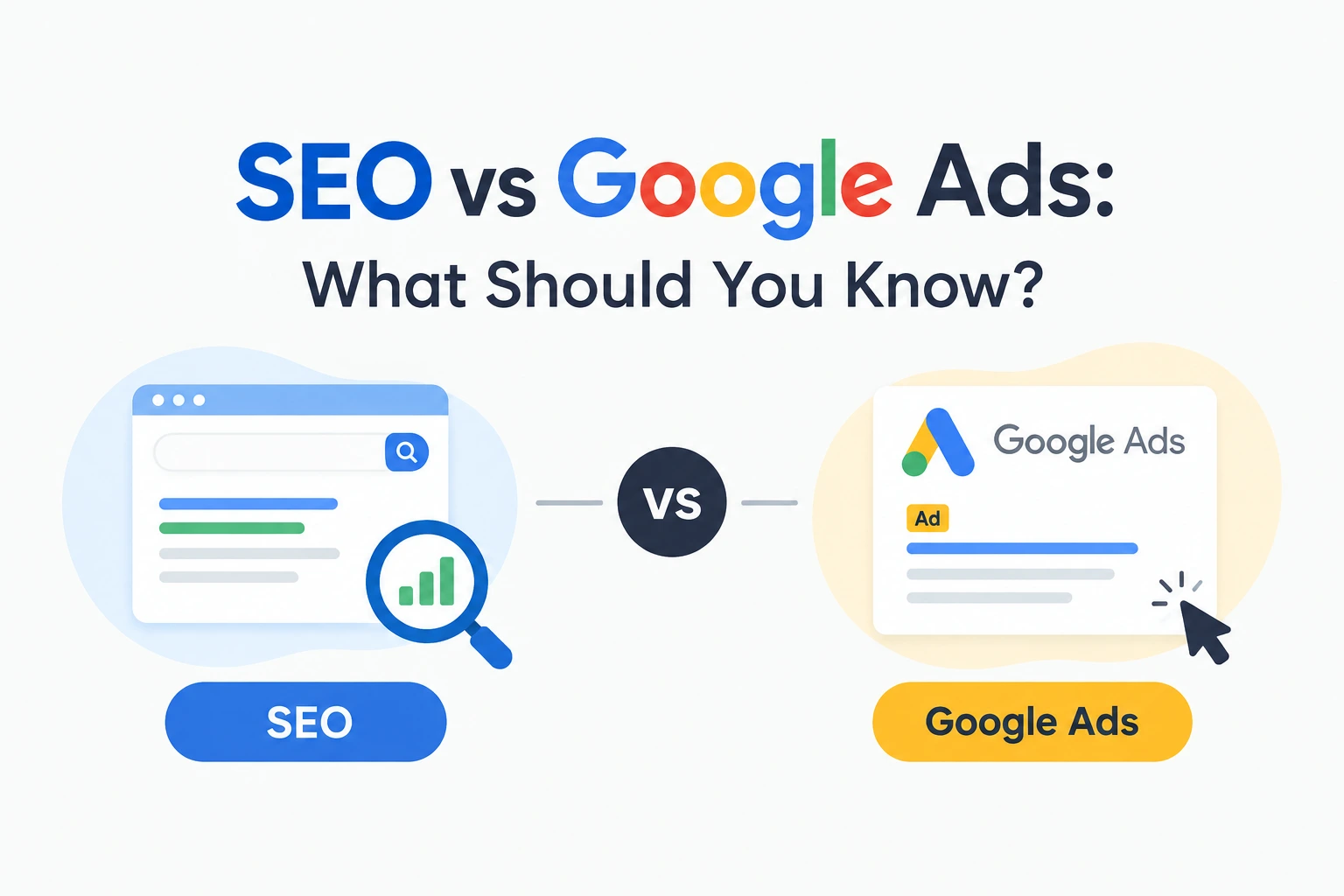
SEO vs Google Ads
Table of Contents
SEO vs Google Ads: What Should You Know?
SEO vs Google Ads is one of the biggest questions business owners ask when they want to get more customers from Google.
You may have heard someone say, “You need SEO.”
Then another person tells you, “Forget SEO. Just run Google Ads.”
So what should you actually do?
The truth is that SEO and Google Ads work differently. SEO focuses on improving your website and online presence so that your pages can appear in Google’s organic search results. Google Ads is a paid advertising platform where businesses can create ads that may appear when people search for relevant products or services. Google explains that ads and organic search results are separate ways websites can appear in Search.
This doesn’t mean one option is automatically right for every business.
Your budget, goals, competition, website, timeline, and target audience all matter.
In this guide, we’ll break down SEO vs Google Ads in simple language so you can understand how they work, what they cost, how quickly they can bring traffic, and when each approach may make sense.
What Is SEO?
SEO stands for Search Engine Optimization.
In simple words, SEO vs Google Ads starts with understanding what SEO actually does. SEO is the process of improving your website so search engines can better understand your content and users can find your pages through organic search.
For example, imagine you run a bakery in Delhi.
Someone searches:
“best birthday cake bakery in Delhi”
If your website has useful, relevant content and your pages are eligible to appear in search, SEO can help your business compete for visibility for searches related to your products or services.
SEO can involve things such as:
- Keyword research
- Helpful content
- On-page SEO
- Technical SEO
- Internal linking
- Website structure
- Image optimization
- Local SEO
- Website performance
- Building relevant authority
Google’s own Search Central documentation explains that SEO is about helping search engines understand your content and helping users find your site through search.
The important thing to understand is that SEO isn’t simply adding a keyword to a page.
It involves many parts of your website and content working together.
What Is Google Ads?
Google Ads is Google’s online advertising platform.
Understanding SEO vs Google Ads also means understanding how Google Ads works differently from organic search.
Instead of waiting for your website to appear organically in search results, you can create paid advertisements that may appear when people search for relevant terms.
For example, suppose you offer:
“Website Design Services in Delhi.”
You could create a Google Search campaign targeting relevant searches. When someone searches for terms related to your services, your ad may become eligible to appear.
Google says Search ads are selected through an ad auction that considers factors including the bid, ad and landing-page quality, competition, search context, and other signals.
With Google Ads, you also control your campaign budget and bidding settings. Google says there is no minimum spending commitment, and advertisers can set their own budgets.
So unlike SEO, Google Ads involves directly paying for advertising.
SEO vs Google Ads: What Is the Main Difference?

The easiest way to understand SEO vs Google Ads is to think about organic visibility VS paid visibility.
SEO
You work on your website and content to earn visibility in organic search.
Google Ads
You pay to participate in Google’s advertising system and compete for eligible ad placements.
Google itself explains that search ads can appear at the top or bottom of a results page, while organic search results generally appear in the main search results area.
This creates an important difference.
With SEO, you’re building an asset on your website.
With Google Ads, you’re paying for advertising exposure.
Both can be useful, but they require different approaches.
SEO vs Google Ads: 7 Key Differences

1. Cost
When looking at SEO vs Google Ads, cost should always be considered alongside your business goals.
One of the first things business owners think about is cost.
SEO does not charge you a fee every time someone clicks your organic search result. However, SEO still requires investment.
You may spend money on:
- SEO services
- Content creation
- Website improvements
- SEO tools
- Technical work
- Link-building activities
Google Ads works differently.
You set a budget and bidding strategy for your campaigns. With cost-per-click bidding, you’re generally charged when someone clicks your ad. Google states that advertisers control their budgets and maximum CPC bids.
So when comparing SEO vs Google Ads, don’t think:
SEO = free
and
Google Ads = expensive.
That’s too simple.
Both can require investment. The difference is how that investment is used.
2. Speed
Speed is another important part of the SEO vs Google Ads decision.
SEO usually takes time.
You may publish a page today, but that doesn’t mean it will immediately appear at the top of Google.
Google needs to crawl, understand, and evaluate pages, and search visibility can change over time.
Google Ads can give you an opportunity to get paid visibility much faster once your campaign is set up and eligible to run.
That doesn’t mean every Google Ads campaign will automatically produce good results.
Your:
- Keywords
- Ads
- Landing pages
- Budget
- Targeting
- Competition
- Bidding
- Conversion tracking
all matter.
Google explains that ad eligibility and position are influenced by factors such as Ad Rank, ad quality, bids, competition, and search context.
3. Long-Term Value
SEO can be useful for building long-term organic visibility.
Imagine you create a helpful page that starts bringing relevant visitors from search.
That page can continue attracting organic traffic without you paying for every individual click.
However, maintaining SEO still requires ongoing work.
You may need to:
- Update old content
- Fix technical problems
- Improve pages
- Monitor rankings
- Create new content
- Adapt to changes in search behavior
Google Ads is more campaign-based.
You pay to advertise and can control when campaigns run.
This makes the two approaches very different from each other.
This is one of the biggest differences businesses notice when comparing SEO vs Google Ads.
4. Control
When considering SEO vs Google Ads, control is another factor worth understanding.
Google Ads gives advertisers direct control over many campaign settings.
You can choose things such as:
- Budget
- Keywords
- Location
- Ad messaging
- Bidding
- Landing pages
- Campaign settings
Google notes that advertisers can control their budgets and use targeting options such as location, language, devices, and other settings.
SEO gives you control over your website and optimization work, but you don’t directly control Google’s organic rankings.
That’s an important distinction.
You can improve your website.
You cannot simply tell Google:
“Put my page at number one tomorrow.”
5. Type of Traffic
SEO and Google Ads can both bring relevant visitors, but the way those visitors reach your website is different.
With SEO, someone may find your page through an organic search result.
With Google Ads, someone may click your advertisement after it becomes eligible for their search.
For example, someone searching:
“digital marketing agency near me”
could potentially see both paid advertisements and organic results.
Google explains that search ads can appear alongside organic search results.
The SEO vs Google Ads approach you choose can also affect how visitors discover your business.
6. Testing and Measurement
Google Ads provides detailed campaign data that can help advertisers evaluate clicks, conversions, spending, and other campaign metrics.
Google says advertisers can track whether people clicked their ads and whether they completed valuable actions such as purchases, app downloads, or calls.
SEO also has measurement tools.
You can monitor things such as:
- Organic clicks
- Impressions
- Search queries
- Pages receiving traffic
- Search visibility
- Conversions
The difference is that paid campaigns can provide more direct control over the advertising variables you’re testing.
Measurement is especially important when making an SEO vs Google Ads decision.
7. Sustainability
SEO can become a valuable long-term marketing asset because your website can continue attracting organic visibility after individual pieces of content are created.
But SEO isn’t something you do once and forget.
Your competitors are also improving their websites.
Search behavior changes.
Your content can become outdated.
Technical problems can appear.
Google’s search systems can change.
So SEO requires ongoing attention.
Google Ads can be paused, changed, increased, or reduced according to your campaign requirements.
That flexibility can be useful when you have a specific promotion, product launch, seasonal offer, or short-term campaign.
This makes sustainability another important point in the SEO vs Google Ads discussion.
When Should You Choose SEO?
SEO may be worth considering when your business wants to build organic search visibility over time.
It can be especially relevant if:
- You want long-term website growth
- Your customers regularly search for your services
- You have useful content to create
- You want to build organic visibility
- You have time to invest in ongoing optimization
- You want to strengthen your website as a long-term asset
For example, a digital marketing agency could create useful pages around SEO, Google Ads, social media marketing, website design, and other services.
Those pages can potentially target relevant organic searches over time.
If you’re deciding between SEO vs Google Ads, think about whether your priority is long-term organic visibility.
When Should You Choose Google Ads?
For businesses comparing SEO vs Google Ads, Google Ads can be useful when speed and campaign control are important.
It can be particularly useful for:
- New offers
- Product launches
- Lead generation
- Local services
- Seasonal promotions
- Time-sensitive campaigns
- Testing commercial keywords
For example, imagine you launch a new service and want to start promoting it immediately.
Waiting for organic visibility may not fit your timeline.
A paid campaign could give you an opportunity to advertise for relevant searches while your SEO work continues.
Google says advertisers can set budgets and choose targeting options, while ads enter an auction to determine eligibility and placement.
Can You Use SEO and Google Ads Together?
Yes. In fact, when considering SEO vs Google Ads, you don’t always have to choose only one.
In fact, you don’t always have to choose one.
This is where SEO vs Google Ads becomes less about “which one wins?” and more about understanding how they can support different goals.
For example:
SEO can help you build organic visibility.
Google Ads can help you run targeted paid campaigns.
You could use Google Ads while your SEO strategy is developing.
At the same time, you could use information from your advertising campaigns to understand which searches, offers, or landing pages are generating interest.
SEO and Google Ads can also work alongside other digital marketing Courses depending on your business goals.
Google itself notes that businesses can use both search results and ads to connect with customers.
SEO vs Google Ads: Which Is Better for a New Business?
There isn’t one answer that works for every new business.
A new business should first ask:
“What am I trying to achieve right now?”
If you need visibility for a time-sensitive offer, Google Ads may be relevant.
If you’re building a website and want long-term organic visibility, SEO may be important.
If you have enough resources, using both can be another option.
For a small business, however, budget matters.
Instead of trying to do everything at once, decide which channel matches your immediate business goal and build from there.
SEO vs Google Ads: What About Budget?
Your budget should not be based on what another business spends.
A business selling a ₹500 product and a business selling a ₹5 lakh service may have completely different advertising economics.
With Google Ads, you can set an average daily budget and choose bidding options. Google explains that monthly spending limits are calculated from the average daily budget and the average number of days in a month.
With SEO, your investment may go toward:
- Content
- Website development
- SEO services
- Technical optimization
- Local SEO
- SEO tools
The important question is:
What can your business realistically invest while still measuring results?
If you’re trying to plan your overall marketing budget, you can also explore our Affordable Digital Marketing Packages to understand what type of digital marketing support may fit your business.
Common Mistakes Businesses Make
Choosing Google Ads without a proper landing page
Sending every ad visitor to a random homepage isn’t always the best approach.
Your landing page should match the advertisement and the searcher’s intent.
Google considers landing-page quality and relevance as part of its advertising systems.
Expecting SEO results overnight
SEO requires patience.
Publishing one article doesn’t automatically mean your page will rank immediately.
Running Google Ads without tracking conversions
Clicks are useful, but businesses should also understand what happens after the click.
If you’re generating leads, purchases, calls, or other valuable actions, tracking those actions can help you evaluate campaign performance.
Ignoring SEO because you’re running ads
Paid advertising doesn’t mean your website no longer needs organic optimization.
Your website still needs useful content, good pages, and a positive user experience.
Thinking SEO is completely free
SEO may not charge per click, but professional SEO still requires time, skills, tools, content, and ongoing work.
So, What Should You Choose?
If you’re still confused about SEO vs Google Ads, make the decision based on your goal rather than choosing based on what is trending.
Choose SEO when your priority is:
- Long-term organic visibility
- Building website authority
- Creating useful content
- Growing organic traffic
- Developing a sustainable search presence
Consider Google Ads when your priority is:
- Faster paid visibility
- Promoting a specific offer
- Generating targeted traffic
- Testing commercial searches
- Running time-sensitive campaigns
Consider both when:
- You have enough resources
- You need short-term and long-term strategies
- Your business depends heavily on Google
- You want to diversify your search visibility
FAQs
1. If I have a small budget, should I start with SEO or Google Ads?
It depends on your immediate goal. If you need to promote something quickly, Google Ads may be useful. If you’re building your website for long-term growth, SEO may deserve more attention. You can also start small and expand once you understand what works for your business.
2. I’m already running Google Ads, so do I really need SEO too?
Running ads doesn’t mean you should ignore your website’s organic visibility. SEO and Google Ads work differently, so improving your website and building organic visibility can complement your paid campaigns.
3. Why am I paying for Google Ads but not getting enough customers?
Getting clicks doesn’t automatically mean you’ll get customers. Your keywords, ad message, landing page, offer, targeting, budget, competition, and conversion tracking can all affect campaign performance. Google also considers ad and landing-page quality when determining ad performance.
4. Can I stop Google Ads once my SEO starts working?
You can adjust or pause advertising campaigns, but whether you should depends on your business goals and the results you’re getting from each channel. Some businesses may continue using paid campaigns for specific products or offers while also receiving organic traffic.
5. Honestly, can I do SEO and Google Ads myself?
You can learn the basics of both yourself. However, managing campaigns and SEO properly can become complicated as your website and budget grow. If you’re short on time or don’t understand the technical side, professional help may save you time and reduce avoidable mistakes.
Conclusion
When comparing SEO vs Google Ads, the biggest mistake is thinking that one is automatically better for every business.
Understanding SEO vs Google Ads starts with knowing that SEO and Google Ads solve different marketing problems.
SEO focuses on organic search visibility and improving your website over time.
Google Ads gives businesses a paid advertising system where they can control budgets, targeting, bidding, and campaign settings.
If your business needs long-term organic visibility, SEO can be an important part of your strategy.
If you need targeted paid visibility for a specific offer or campaign, Google Ads may be useful.
And if your budget and goals allow it, you don’t necessarily have to choose only one.
The smarter approach is to understand your business goal, decide what you can realistically invest, track the results, and adjust your strategy as you learn.
Not sure how to build the right strategy for your business? Explore QBIXINFO’s digital marketing services and discover how we can help you improve your online presence, generate leads, and grow your business.
Affordable Digital Marketing Packages
Table of Contents
Affordable Digital Marketing Packages can be a great option for businesses that want to grow online without spending more money than they can afford. If you are a business owner, you may already know that having a website or social media page is not always enough. People need to find your business online before they can become your customers.
But there is one common problem. When you search for digital marketing services, you may see many different packages and prices. One company may offer SEO, another may focus on social media, and another may offer everything together.
If you are new to digital marketing, this can become confusing.
So, in this blog, we will look at 7 Affordable Digital Marketing Packages, what they can include, who they are suitable for, and how much you may need to keep aside for your marketing budget.
What Are Affordable Digital Marketing Packages?
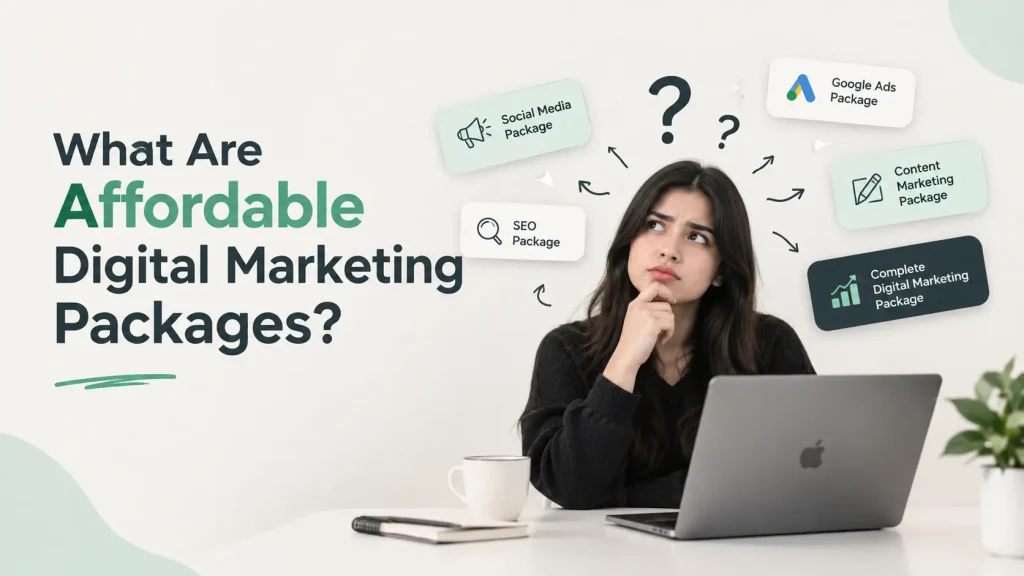
Affordable Digital Marketing Packages are groups of online marketing services offered together at a planned price.
Instead of paying separately for every small service, a business can choose a package that includes the services it needs.
For example, a basic package may include:
- Monthly reporting
- Social media management
- Basic SEO
- Content creation
A bigger package may include:
- SEO
- Social media marketing
- Google Ads
- Meta Ads
- Content marketing
- Email marketing
- Analytics and reporting
The right package depends on your business goals. You don’t always need every service from day one.
7 Affordable Digital Marketing Packages for Different Business Needs
Every business is different. A local shop may need local visibility, while an online store may need ads and social media.
That’s why different Affordable Digital Marketing Packages can be created for different types of businesses.
Here are seven package ideas to help you understand what you could choose.
1. Starter Digital Marketing Package
This can be a good starting point for a new business that is just beginning its online journey.
It can include:
- Basic social media management
- Content planning
- Basic SEO
- Keyword research
- Monthly performance report
Estimated budget: ₹10,000–₹25,000 per month.
Current Indian pricing guides commonly place starter-level digital marketing work around this range, although the exact services included can be very different from one provider to another.
This type of package can work well if you don’t have a large marketing budget yet and want to start with a few important channels.
2. Social Media Marketing Package
If most of your customers spend time on Instagram or Facebook, you may want to focus more on social media.
A social media package may include:
- Instagram management
- Facebook management
- Creative posts
- Reels
- Captions
- Content calendar
- Basic audience engagement
Estimated budget: ₹10,000–₹30,000 per month for basic to standard management.
Published 2026 India pricing examples show social media management ranging from roughly ₹10,000 to ₹50,000+ per month depending on the number of platforms, content volume, reels, and management level.
If you want to see how we approach social media content and brand promotion, you can also visit our QBIXINFO Facebook page.
3. SEO Growth Package
Before investing in SEO, it is also important to understand the common SEO mistakes that can affect your website’s performance.
SEO is useful when you want people to discover your website through Google without paying for every click.
An SEO package may include:
- Keyword research
- On-page SEO
- Technical SEO
- Content suggestions
- Website optimization
- Monthly reports
Estimated budget: ₹15,000–₹50,000+ per month.
The price can increase when the website is larger, the competition is stronger, or more content and technical work are required. Current 2026 pricing guides show SEO packages across a broad range, with starter services often beginning around ₹15,000/month.
4. Google Ads & Meta Ads Package
If you want to reach potential customers through paid advertising, you may consider Google Ads, Meta Ads, or both.
A package may include:
- Campaign setup
- Audience research
- Ad copy
- Creative guidance
- Campaign monitoring
- Performance reports
- Campaign optimization
Estimated management fee: around ₹10,000–₹50,000+ per month, depending on the scope.
Remember that ad spend is usually separate. For example, if you pay an agency ₹15,000 for campaign management and put ₹30,000 into Google or Meta advertising, your total monthly marketing outlay is different from the agency fee alone.
If you’re a beginner, this is something you should always ask about before buying Affordable Digital Marketing Packages.
Google Ads can be used to reach people who are searching for products or services related to your business.
5. Content Marketing Package
Content helps your business communicate with people and answer their questions.
A content package may include:
- Blog writing
- Website content
- Social media captions
- Content calendar
- Basic keyword research
- Content optimization
Estimated budget: ₹15,000–₹40,000+ per month.
The final cost depends on how much content you need and whether the package includes research, graphics, SEO, or other services. Current Indian pricing guides show content marketing pricing varying significantly by scope.
This can be useful for businesses that want to build their online presence through useful content.
6. Local Business Marketing Package
This package can be useful for businesses that serve customers in a particular city or local area.
For example:
- Salons
- Restaurants
- Gyms
- Clinics
- Local shops
- Home service businesses
It may include:
- Google Business Profile optimization
- Local SEO
- Location-based keyword research
- Review strategy
- Local content
- Website optimization
Estimated range: ₹10,000–₹30,000+ per month
7. Complete Digital Marketing Package
This is a broader package for businesses that want several marketing channels working together.
It may include:
- SEO
- Social media marketing
- Content marketing
- Google Ads
- Meta Ads
- Email marketing
- Analytics
- Monthly reporting
Estimated range: ₹30,000–₹1,50,000+ per month
Affordable Digital Marketing Packages can cost more when they include several services because they require more planning, content, monitoring, and regular optimization.
Digital Marketing Package Prices: How Much Should You Budget?
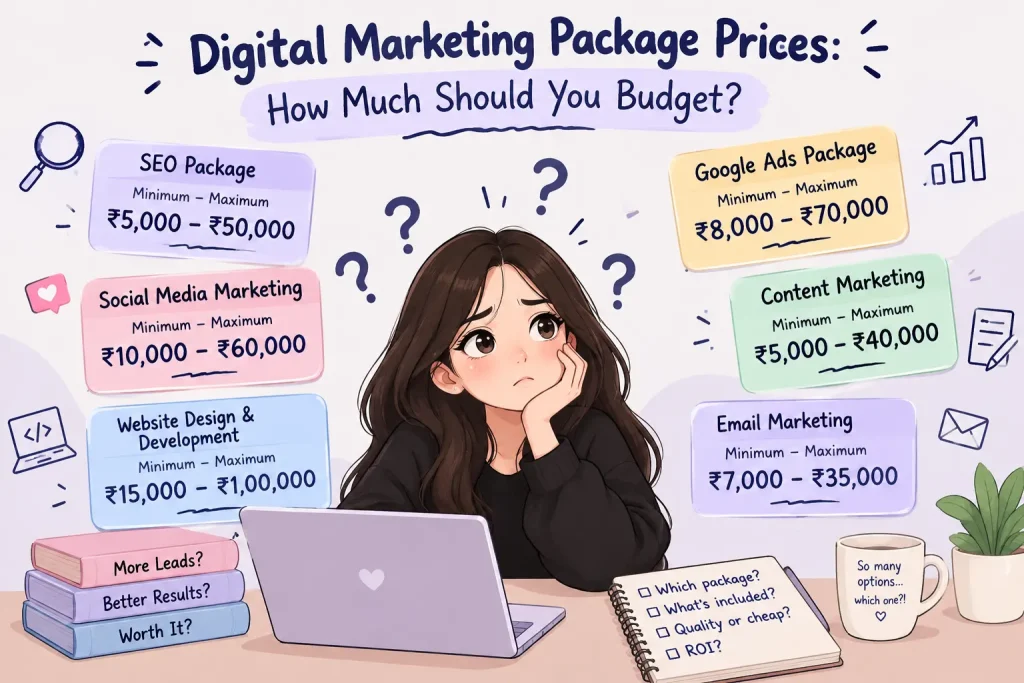
When comparing Affordable Digital Marketing Packages , don’t look only at the cheapest option. First, understand what you are actually getting.
A simple budget guide could look like this:
Monthly Budget | Possible Focus |
| ₹10,000–₹20,000 | Starter marketing |
| ₹20,000–₹40,000 | One or two main services |
| ₹40,000–₹75,000 | Multiple marketing services |
| ₹75,000–₹1,50,000+ | Larger multi-channel marketing |
These are estimated planning ranges, not fixed prices. Your actual cost can depend on your business, industry, competition, services, and marketing goals.
How to Choose Affordable Digital Marketing Packages?
Choosing Affordable Digital Marketing Packages becomes easier when you first understand what your business actually needs.
Ask yourself:
- Do I need more website visitors?
- Do I want more social media activity?
- Do I need more leads?
- Do I want online sales?
- Do I want more local customers?
- Do I want to build brand awareness?
For example, a local salon may not need every service. It may first focus on social media and local SEO.
A growing e-commerce business may need SEO, social media, paid advertising, content, and analytics.
So, don’t choose a package simply because it has the lowest price. Choose one that matches your actual goal.
What Should You Check Before Buying a Package?

Before purchasing Affordable Digital Marketing Packages, ask the agency a few simple questions.
- What services are included?
- How many social media platforms are covered?
- How much content will be created?
- Is SEO included?
- Is advertising management included?
- Is ad spending separate?
- Will I receive monthly reports?
- Is there a contract?
- Can I change my package later?
These questions can help you understand exactly what you are paying for.
Affordable Digital Marketing Services for Small Businesses
Small businesses often have limited marketing budgets, so they need to spend carefully.
Affordable Digital Marketing Services can allow a small business to start with the services that matter most instead of paying for everything at once.
For example, you could start with social media and local marketing, then add SEO or paid advertising when your budget increases.
The goal is not to spend the most money. The goal is to use your available budget in a smart way.
If you are new to digital marketing and want to understand the different areas first, you can explore our guide to Digital Marketing Courses.
How Much Should Your Digital Marketing Budget Be?
Your Digital Marketing Budget depends on your business size, goals, competition, and available money. Before choosing Affordable Digital Marketing Packages, think about how much you can comfortably spend each month.
If you’re just starting, you can begin with a smaller package. Once you understand which channels are bringing results, you can increase your budget and add more services.
You don’t need to spend ₹1 lakh just because another business is doing it. Your Digital Marketing Budget should make sense for your own business.
FAQs
1. I’m confused between two packages. Should I just pick the one with the lower price?
Not always. A lower price does not automatically mean you are getting a better deal. Before choosing Affordable Digital Marketing Packages, check what is actually included in each one. One package may be cheaper but include fewer services, while another may cost more but provide the services your business really needs.
2. Do I have to buy a big package when I’m just starting my business?
No. If your business is new, starting small can actually make things easier. You can choose Affordable Digital Marketing Packages that focus on your most important goal first. Once you understand what is working for your business, you can add more services instead of paying for everything from the beginning.
3. What if I only need social media right now? Do I have to pay for SEO too?
Not necessarily. Your package should match your current needs. If social media is your main priority, you can look for a package focused on social media instead of paying for services you aren’t ready to use. Later, you can add SEO, ads, or other services when you need them.
4. I’m worried about spending money on marketing and getting nothing back. What should I check?
That’s a very normal concern. Before choosing a package, ask the agency what work they will actually do, how they will measure progress, and what kind of reports you will receive. With Affordable Digital Marketing Packages, you should still know where your money is going and what services you are receiving.
5. Can I change my package later if my business starts growing?
It depends on the agency and its package terms, so ask before you purchase. Ideally, your marketing plan should be flexible enough to grow with your business. You may start with a smaller package and later move to a larger one when you need more Affordable Digital Marketing Packages services.
6. I don’t know anything about digital marketing. How will I know which package is right for me?
Start with your business goal instead of trying to understand every marketing service. Think about whether you need more customers, website visitors, leads, sales, or social media visibility. Once you know your goal, it becomes much easier to compare Affordable Digital Marketing Packages and choose services that make sense for your business.
Conclusion
Affordable Digital Marketing Packages can make online marketing easier for businesses that don’t want to spend a huge amount from the beginning.
Start by understanding your goal, decide your monthly Digital Marketing Budget, and compare what each package actually includes.
Whether you can spend ₹10,000, ₹30,000, or ₹1,00,000+ per month, the important thing is to choose services that can support your business goals.
The right package isn’t necessarily the biggest one. It’s the one that fits your business, your goals, and your budget.
Want to understand exactly what services are available? Explore our digital marketing services and see which options may fit your business.

Digital Marketing Courses
Table of Contents
Digital Marketing Courses are becoming a popular choice for people who want to build practical skills and explore new career opportunities. But when you start looking for a course, you can quickly feel confused because there are so many options available. SEO, social media marketing, Google Ads, Meta Ads, content marketing, email marketing, analytics etc. Where should you actually begin?
Some people may want to specialize in SEO, while others may be more interested in advertising, social media, content, or learning everything together through a complete program.
If you want to understand the different services involved, you can explore our digital marketing services.
In this blog, we’ll explore 8 Digital Marketing Courses, what you can learn from them, how to choose the right course, their fees, and the career opportunities they can offer.
Why Should You Take Digital Marketing Courses?
If you are a beginner, you might be wondering, “Is learning digital marketing really worth it?” It’s normal to have questions like this when you’re getting started. Learning how brands reach people online can open up different career and business opportunities.. From Google searches and websites to Instagram and online ads, digital marketing helps businesses reach the right people.
Build a Digital Marketing Career:

A Digital Marketing Career can give you different options depending on what you enjoy. You can work in a digital marketing agency, join a company, work for a startup, become a freelancer, or even use your skills to promote your own business.
Learn practical skills
Digital Marketing Courses can teach you skills such as SEO, social media marketing, Google Ads, Meta Ads, content marketing, email marketing, and analytics. You can start with one area that interests you and gradually explore the others as you gain experience.
You can start with one area, understand the basics, and slowly learn other areas. A Digital Marketing Career doesn’t have to follow one fixed path because you can choose the skill that interests you most.
Start Even If You Are a Beginner
You don’t need to be a technical person to start learning digital marketing. Most of the Courses begin with basic concepts and slowly move toward practical work.
If you are consistent with learning and practice, you can build a Digital Marketing Career step by step instead of trying to learn everything in one week.
How to Choose the Right Digital Marketing Course?
Choosing between different Digital Marketing Courses can be confusing, especially when every course claims to offer something different. Don’t pick a course just because you’ve heard its name everywhere. First, check the topics, skills, and practical work included in the course.
Understand Digital Marketing Training :
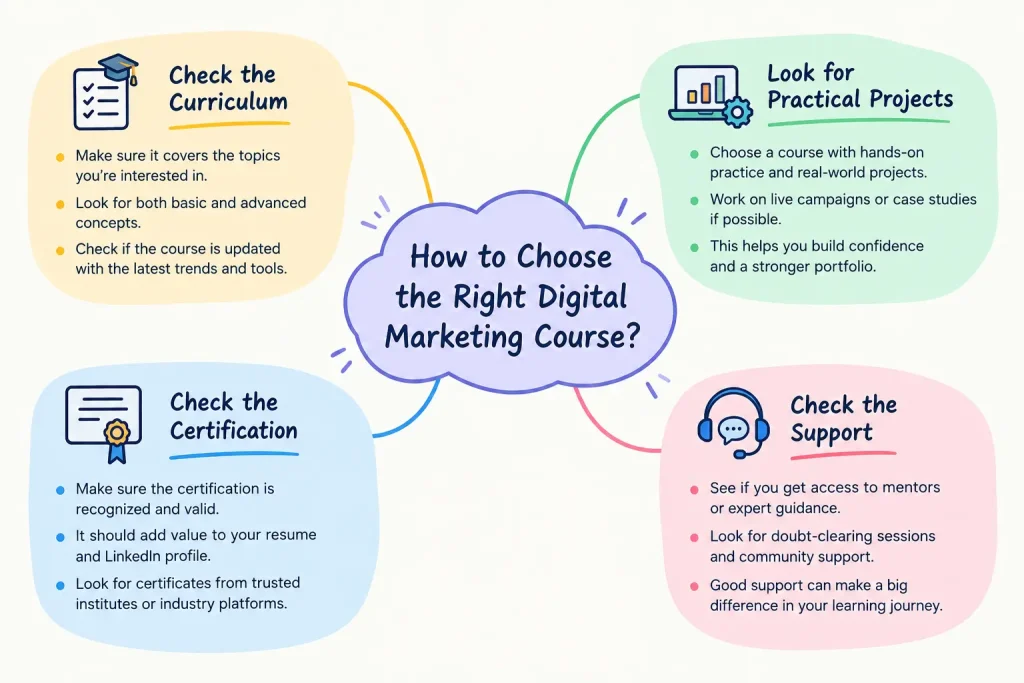
Check the Course Curriculum
Good Digital Marketing Training should clearly explain what topics are included in the course. Go through the syllabus and see if it includes the digital marketing skills you want to develop.
For example, if you are interested in SEO, make sure the course covers things like keyword research, on-page SEO, technical SEO, link building, and basic SEO tools.
Look for Practical Projects
Digital Marketing Courses are more useful when you get a chance to practice what you learn. Reading about Google Ads or SEO is different from actually creating a campaign or working on a website.
Practical Digital Marketing Training can help you understand what happens when you actually apply your knowledge.
Check Certification
Some Courses provide certificates after completion. A certificate can be useful for showing that you completed a course, but don’t choose a course only because it offers a certificate.
What you actually learn and what you can do with those skills are also important.
Check Support
If you’re a beginner, you may have many questions while learning. Good Digital Marketing Training should ideally give you some way to ask questions, get guidance, or clear your doubts.
Best Digital Marketing Courses to Learn
There are many Courses available, but you don’t necessarily need to learn every skill separately. Your choice can depend on your career goal, interest, budget, and available time.

Online Digital Marketing Courses :
1. SEO Course
An SEO course teaches you how websites can improve their visibility on search engines. You can learn about keyword research, on-page SEO, technical SEO, content optimization, and backlinks.
Practical SEO work can be useful if you enjoy working with websites, content, and search engines.
SEO can be a good starting point for beginners because you can practice many concepts on your own website or a sample project.
If you’re planning to learn SEO, it’s also important to understand the mistakes beginners commonly make. You can read our guide on Common SEO Mistakes Small Businesses Make to learn more.
2. Social Media Marketing Course
A social media marketing course focuses on platforms such as Instagram, Facebook, LinkedIn, and other social networks.
You can learn how to create content, plan posts, understand audiences, improve engagement, and manage social media pages.
Among different Digital Marketing Courses, this option may suit people who enjoy creativity, communication, content creation, and working with social media platforms.
3. Google Ads Course
Google Ads is about paid advertising on Google’s platforms. You can learn how search ads work, how to choose keywords, create campaigns, understand budgets, and check campaign performance.
Google Ads should ideally include practical campaign examples rather than only explaining theory.
This course can be useful if you are interested in paid advertising and data-based marketing.
4. Meta Ads Course
A Meta Ads course focuses mainly on advertising through platforms such as Facebook and Instagram.
You can learn about campaign objectives, audiences, ad creatives, budgets, placements, and basic performance tracking.
If you enjoy social media and advertising, this can be a useful skill to add to your learning path.
If you’re interested in learning Meta advertising, you can also explore Meta Blueprint courses to understand different advertising topics and formats.
5. Content Marketing Course
Content marketing is about creating useful content that attracts and helps your target audience.
You can learn about blog writing, content planning, audience research, storytelling, and different types of online content.
Digital Marketing Courses that include content marketing can help you understand how content supports SEO, social media, email marketing, and other marketing activities.
6. Email Marketing Course
Email marketing teaches you how businesses communicate with customers through email.
You may learn how to create email campaigns, write subject lines, organize email lists, and understand basic email performance.
For someone who enjoys writing and communication, this can be a useful addition to their learning journey.
7. Google Analytics Course
Google Analytics helps you understand what people are doing on your website.
You can learn how to look at website traffic, understand where visitors are coming from, check important pages, and study basic user behavior.
Digital Marketing Courses that teach analytics can help you understand whether your marketing efforts are actually bringing results.
8. Complete Digital Marketing Course
If you don’t want to learn only one skill, a complete digital marketing course can introduce you to multiple areas together.
It may cover SEO, social media, Google Ads, Meta Ads, content marketing, email marketing, analytics, and other important topics.
For a beginner, complete Digital Marketing Courses can give you a wider understanding of how different marketing channels work together.
Digital Marketing Course Fees
The cost of Digital Marketing Courses can vary depending on the institute, duration, learning format, and curriculum. For example, the University of Delhi’s Campus of Open Learning lists its Certificate Course in Digital & Social Media Marketing at ₹30,000 for a six-month program. You can check the course fees and curriculum here before comparing it with other options.
The price can depend on things such as:
- Course duration
- Number of modules
- Practical projects
- Trainer experience
- Certification
- Live classes
- Course support
- Tools and resources included
Before paying for Digital Marketing Courses, check exactly what is included in the price. A cheaper course may have fewer features, while a more expensive course may include live training, projects, mentorship, or additional resources.
When comparing Digital Marketing Course Fees, don’t look only at the price. Think about what you are actually getting for that amount and whether it matches your learning goals.
Career Opportunities After Learning Digital Marketing
One reason people choose Digital Marketing Courses is because they want to build a career in the digital field. The good thing is that you don’t have to choose only one type of job.
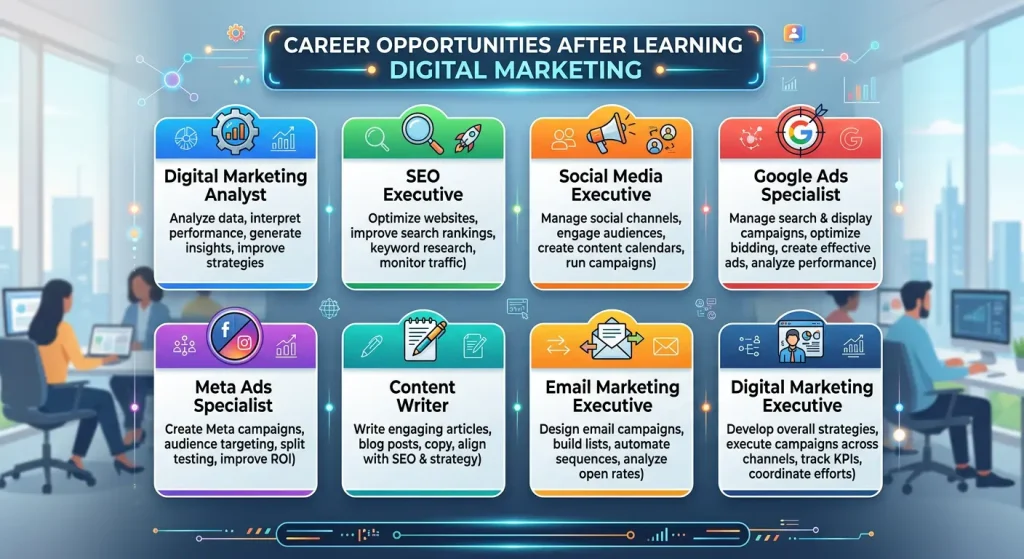
Explore Digital Marketing Jobs
Some Digital Marketing Jobs include:
- Digital Marketing Analyst
- SEO Executive
- Social Media Executive
- Google Ads Specialist
- Meta Ads Specialist
- Content Writer
- Email Marketing Executive
- Digital Marketing Executive
Your first role doesn’t have to be your final career goal. You can start with one skill and develop more skills as you gain experience.
It can give you the knowledge to get started, but practical experience is also important. Try working on projects, practicing with tools, or managing a small website so you can understand how things work in real situations.
As you gain more experience, different Digital Marketing Jobs may become available to you. You can also choose freelancing, agency work, an in-house marketing role, or use digital marketing for your own business.
FAQs
1. I’m completely new to digital marketing. Which course should I start with?
If you’re completely new, I’d suggest starting with a Complete Digital Marketing Course because you get to learn different areas instead of focusing on only one skill. You can understand SEO, social media, Google Ads, content marketing, email marketing, and analytics. After that, you can decide which area you enjoy the most and learn it more deeply.
2. Do I really need to take a course, or can I just learn digital marketing from YouTube?
You can definitely learn some basics from YouTube and free resources. But a good course can make the learning process more organized because everything is usually taught step by step. Instead of jumping between random videos, you can follow one proper learning path and practice what you learn. So, if you’re serious about building digital marketing skills, one of the structured Digital Marketing Courses can be helpful.
3. How long will it take me to actually become good at digital marketing?
There isn’t one fixed time because it depends on how regularly you learn and practice. You can understand the basics within a few weeks, but becoming confident takes more practice. Try working on small projects, creating campaigns, writing content, or improving a website while learning. That’s where Digital Marketing Courses become more useful—you don’t just learn the theory, you can also apply it.
4. Are these courses actually useful for getting a job?
They can help you build the skills needed for different digital marketing roles, but completing a course alone doesn’t guarantee a job. Along with learning, try to build some practical projects and create a portfolio that shows what you can actually do. This can make it easier to demonstrate your skills when applying for digital marketing jobs.
5. There are so many Digital Marketing Courses online. So how can I choose the right one for me?
Don’t choose a course just because it has a fancy title or a lot of students. First, check what topics are included, whether practical projects are provided, who teaches the course, how much support you get, and whether the course matches your goal. If you’re comparing Online Digital Marketing Courses, also check reviews and the actual course curriculum before making a decision.
6. Do I have to learn every part of digital marketing?
Not necessarily. You can start by learning the basics of digital marketing and then choose an area you enjoy. For example, you might become more interested in SEO, social media, paid advertising, content marketing, or analytics. Learning different areas through Digital Marketing Courses can help you understand which skill you want to focus on later.
7. I only have a small budget. Can I still find a good digital marketing course?
Yes, definitely. You don’t always need to choose an expensive course to learn digital marketing. If you have a small budget, compare the Digital Marketing Course Fees, topics covered, practical projects, course support, and what you will actually learn before paying. A reasonably priced course with useful practical training can be more valuable than an expensive course that only focuses on theory.
8. Is a certificate enough to get a digital marketing job?
A certificate can show that you completed a course, but by itself, it may not be enough to get a job. Employers also look at your practical skills and whether you can actually apply what you learned. While taking Digital Marketing Courses, try to work on real or practice projects, build a small portfolio, and learn how different digital marketing tools work. This can help you show what you can actually do, not just what you have studied.
Conclusion
Starting a career in digital marketing can feel confusing in the beginning, but you don’t have to learn everything at once. Digital Marketing Courses can help you understand different skills and give you a direction to start.
Before choosing a course, check the curriculum, practical projects, support, certification, duration, and Digital Marketing Course Fees. Most importantly, choose something that matches your goals and the amount of time you can give to learning.
Whether you choose SEO, social media marketing, Google Ads, Meta Ads, content marketing, email marketing, analytics, or a complete course, keep practicing what you learn. Digital Marketing Courses can give you the knowledge, but your practice and consistency will help you turn that knowledge into real skills.
Before choosing a course, it’s always useful to understand who is providing the training and what they focus on. You can also learn more about QBIXINFO before making your decision.
Common SEO Mistakes
Table of Contents
Common SEO Mistakes
Common SEO Mistakes can be one of the reasons why your website is not ranking on the first page of Google and why people aren’t finding you, even if your website has great content? You’re putting in so much effort to rank your website, but nothing happens and you feel stuck in between.
Yes, here I am talking about small business owners. Most of the time, small businesses make SEO Mistakes because they are busy managing their daily work and may not have enough time to understand how SEO works. SEO plays an important role in helping your website rank on Google, so first of all, we need to understand what SEO is :
SEO ( Search Engine optimization)
So, what is SEO? If I tell you in very simple language, it simply means helping your website get found on Google. When people search for something related to your business, SEO helps your website appear in the search results. For example, if you own a bakery and someone searches for “best bakery near me,” then good SEO can help your bakery website get noticed. So basically, SEO helps the right people find your business online.
Okay, but even after understanding SEO, what if nothing happens to your website? Simply understanding SEO will not improve your websites visibility or ranking on Google. You have to fulfill many of its criteria, but don’t worry, In this blog, I will tell you the Top 5 Common SEO Mistakes and how you can avoid them and improve your chances of ranking higher on the SERP.
If you want to understand SEO from Google’s own perspective, you can also read the Google Search Essentials.
Top 5 Common SEO Mistakes Small Businesses Make
Keyword Stuffing
Keyword stuffing is one of the most Common SEO Mistakes small businesses make. It happens when you repeat the same keyword too many times just to try to rank higher on Google. The problem is not using the keyword itself, but how many times you keep repeating the same keyword, your content starts sounding unnatural and becomes difficult to read.
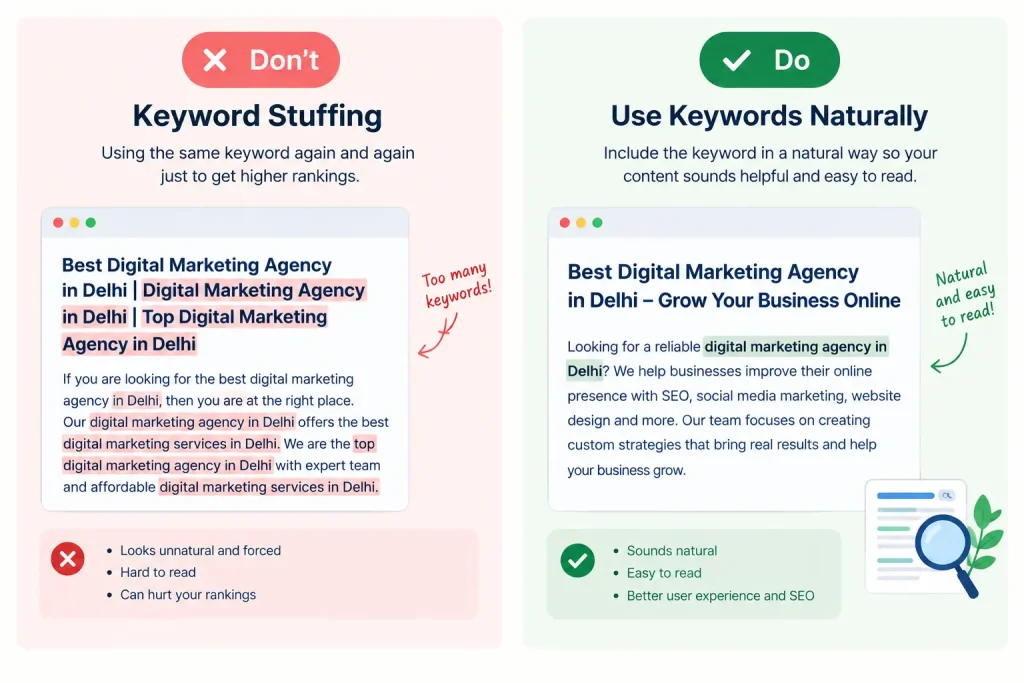
Why is it a mistake?
Keyword stuffing is also one of the Common SEO Mistakes because SEO is not only about putting keywords everywhere. Your content should be useful and easy for people to understand.
For example, imagine you have a bakery and your keyword is “best bakery in Delhi.”
❌ Wrong: We are the best bakery in Delhi. The best bakery in Delhi offers the best cakes. Visit the best bakery in Delhi today.
See how the same keyword is being repeated again and again? It doesn’t sound Natural.
When you use a keyword too many times:
- Your content can sound forced and unnatural.
- It becomes difficult for visitors to read.
- People may leave your website because the content doesn’t feel helpful.
- It can negatively affect your SEO instead of helping it.
How can you avoid it :
The easiest way is to use your main keyword naturally, You can also use related words and phrases instead of repeating the exact same keyword.
For example, instead of writing “best bakery in Delhi” in every sentence, you can write:
✅ Right : Looking for a best bakery in Delhi? We offer fresh cakes, pastries, and other baked goods for every occasion.
This shows that using a keyword is not wrong, the problem is repeating it unnaturally.
Choosing the Wrong Keyword
Choosing the wrong keyword is another Common SEO Mistakes that small businesses often make. When we start SEO, we may think, “This keyword has a lot of searches, so I should use it.” But that’s not always the right approach.
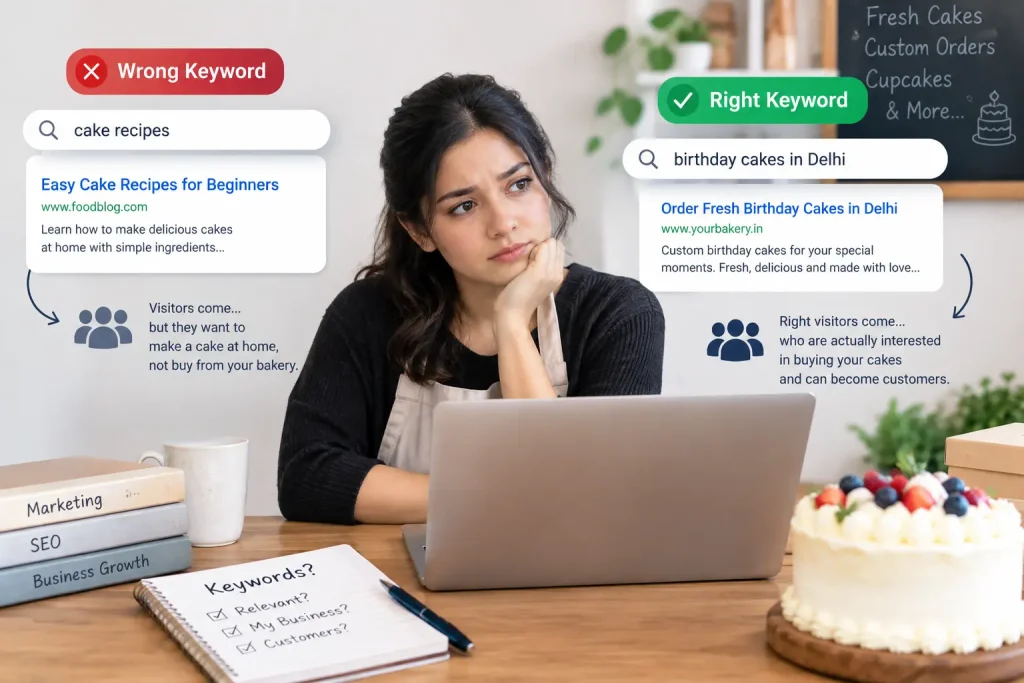
Imagine you own a bakery and you want more people to visit your website. You might think that choosing a popular keyword like “cake recipes” will bring more visitors. And yes, people may visit your website, but most of them are looking for a recipe so they can make a cake at home. They are not looking to buy a cake from your bakery. So, you may get visitors, but they may not become your customers.
This is why Choosing the Wrong Keyword can be a problem because you don’t just want more visitors, you want the right visitors who are interested in your products or services.
How to Avoid It :
The easiest way to avoid these Common SEO Mistakes is to first understand what your customers are actually searching for.
Before choosing a keyword, ask yourself:
- Is this keyword related to my business?
- Are my customers searching for this?
- Does my website actually provide what they are looking for?
Copied Content
Sometimes, when we don’t know what to write, we may simply copy content from another website or copy something generated by AI and use it on our own website. It may seem like an easy way to create content quickly, but it doesn’t provide anything original to your readers.
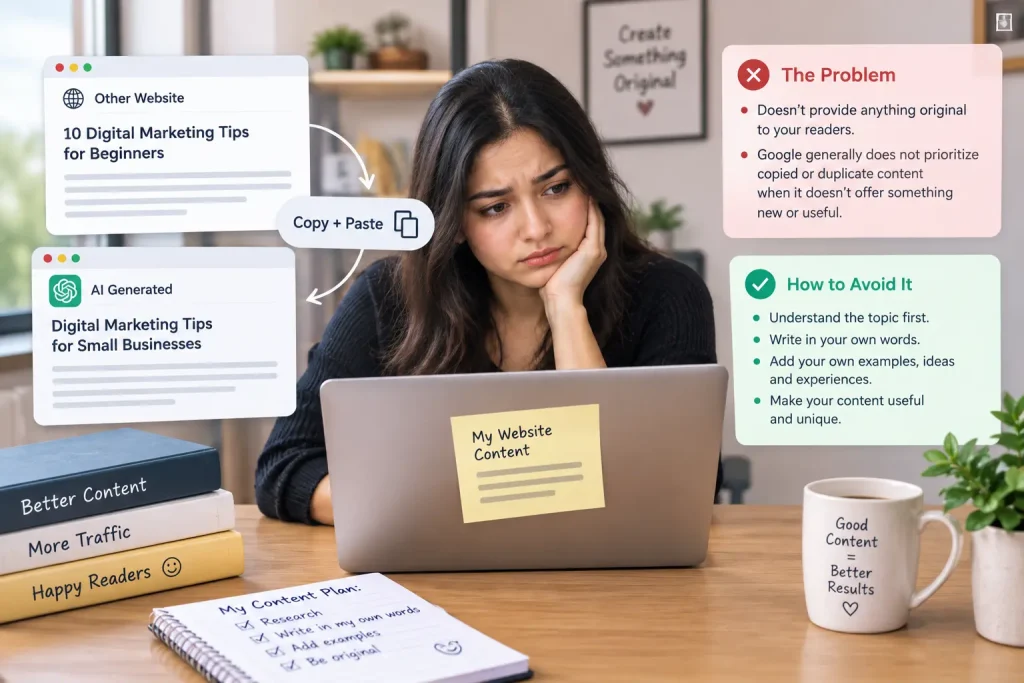
For example, imagine you are writing about digital marketing tips and you copy the whole paragraph from another website. Even if you change a few words or rephrase it, but the content is still not really your own. Google doesn’t usually prioritize Copied Content, especially when it doesn’t offer anything new or useful to the reader.
How to Avoid It :
The easiest way to avoid Copied Content is to understand the topic first and then explain it in your own words. You can research from different websites to learn about a topic, but don’t copy their sentences or paragraphs. Add your own examples, experiences, explanations, and ideas. This makes your content more useful and helps you avoid Common SEO Mistakes.
Ignoring On-Page SEO
As we all know , On-Page SEO means making changes to the things on your own website to help Google understand your page. For example, when you write a blog, you need to take care of things like – title, headings, content, images, and links etc.
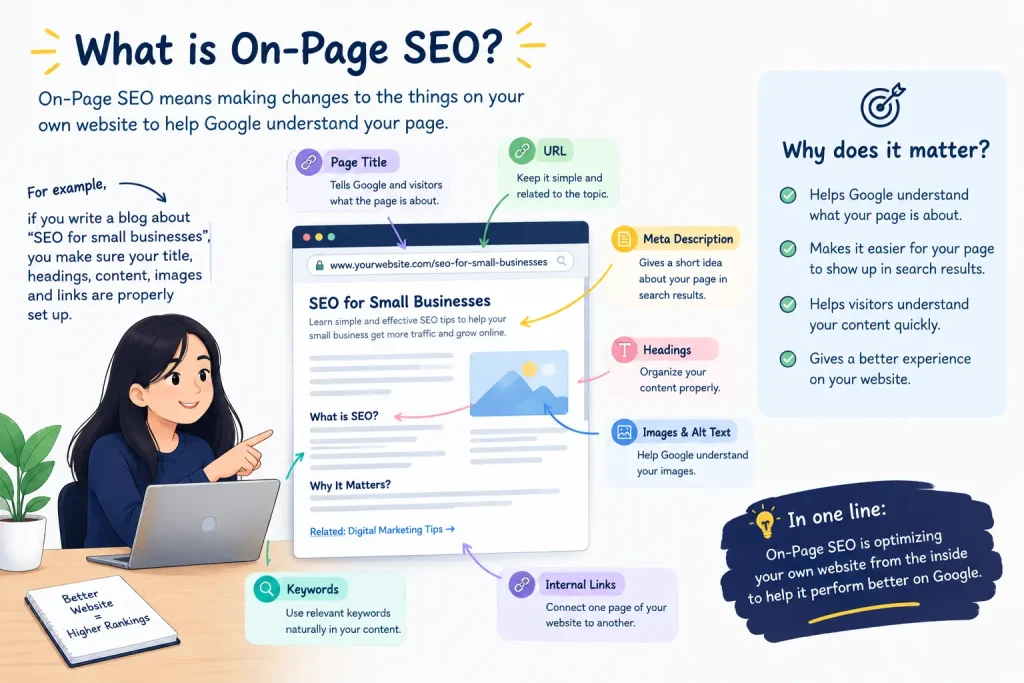
Many Small businesses Ignoring On-Page SEO and focus only on writing content and forget about the small but important things on their website, such as page titles, headings, meta descriptions, URLs, image alt text, and internal links.
Why Does On-Page SEO Matter?
Think of On-Page SEO as helping Google understand what your page is about. When your titles, headings, content, images, and other elements are properly optimized, it becomes easier for search engines to understand your website and show it to people searching for relevant information. It also helps visitors understand your page quickly and have a better experience on your website.
How to Avoid It :
The easiest way to avoid one of these Common SEO Mistakes is to create a simple On-Page SEO checklist. Before publishing a page, check whether your main keyword is used naturally in the title, URL, introduction, headings, and content. Also, add useful internal links and descriptive alt text to your images.
Ignoring Technical SEO
Ignoring Technical SEO is another Common SEO Mistakes that small businesses often make. Technical SEO simply means making sure your website works properly and Google can understand it.
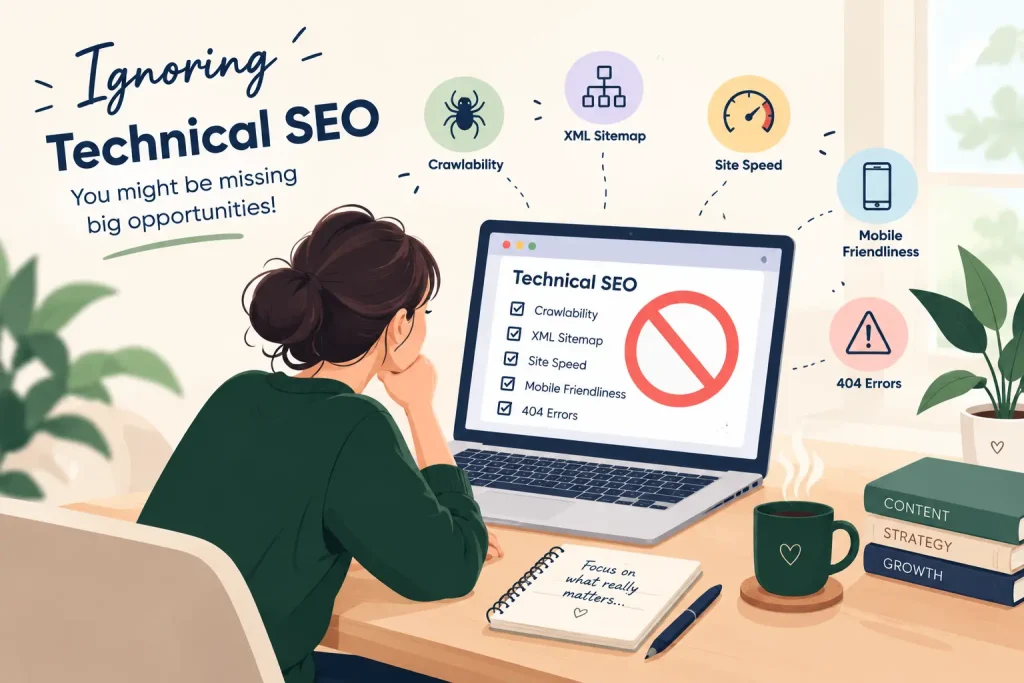
Some basic things to check are:
- Sitemap: Keep a sitemap so search engines can understand the structure of your website.
- Website Speed: Make sure your website loads quickly. People may leave if it takes too long.
- Mobile-Friendly: Your website should work properly on phones because many customers search from mobile devices.
- Broken Links: Check that your links work and don’t lead visitors to error pages.
- HTTPS: Make sure your website is secure and starts with HTTPS.
- Indexing: Check that your important pages can be found and indexed by Google. You can learn more about how Google crawls and indexes websites in its official documentation.
How to Avoid It :
You don’t need to be a technical expert. Start by checking these basic areas regularly. Fix broken links, improve your website speed, check the mobile version, and make sure your important pages are indexed.
By taking care of these simple things, you can avoid Ignoring Technical SEO and reduce Common SEO Mistakes that may affect your website’s visibility.
FAQs :
Can I choose a keyword If it has a lot of searches?
Not really. If you’re choosing a keyword just because it has a lot of searches, but that keyword doesn’t match your content, then there is no real value in using that keyword. This can also become one of the Common SEO Mistakes that can affect your content strategy. You should always choose keywords according to your content and what your audience is actually searching for.
If I fix all these SEO mistakes, will my website rank immediately?
No, not immediately. Fixing Common SEO Mistakes can improve your website, but SEO usually takes some time to show results. Google needs to crawl and understand your updated pages before your rankings can change. Keep improving your content, keywords, and website regularly, and give Google some time to notice those changes.
How do I know which keyword people are actually searching for?
You can use tools like Keyword Surfer to check what people are searching for and get ideas for relevant keywords. Before choosing one, make sure it matches your business and what your audience actually needs. Choosing the right keyword can help you avoid Common SEO Mistakes and bring more relevant visitors to your website.
Why isn’t my page ranking even though I used the right keyword?
Using the right keyword is important, but it doesn’t guarantee that your page will rank. Common SEO Mistakes like poor content, copied content, weak On-Page SEO, or technical problems can still affect your rankings. Google looks at many things before ranking a page, so focus on creating useful content, improving your website, and giving SEO some time to work.
I’m new to business and I want to rank my page on Google. Should I hire an SEO expert?
You can go for either option. If you have enough time, you can learn the basics of SEO and start working on your website yourself. But if you’re new to SEO, don’t have enough time, or find things like technical SEO confusing, you can hire an SEO expert to handle it for you.
But if I were in your place, I would choose to learn and do the basics myself in the beginning. This will help you understand how SEO works, what an SEO expert actually does, and how to avoid Common SEO Mistakes on your website.
How can I check all these Common SEO Mistakes so I don’t miss anything?
You don’t have to check everything at once. Start by checking your keywords, content, headings, images, internal links, and technical SEO one by one. You can also use SEO tools to find issues that you may not notice yourself. The important thing is to make a simple checklist and go through it before and after publishing your page, so you can catch these Mistakes and fix them early.
Conclusion :
SEO can be confusing when you are just starting, but avoiding these Common SEO Mistakes can make a big difference for your small business. From keyword stuffing and choosing the wrong keywords to copied content, ignoring On-Page SEO, and ignoring Technical SEO, each mistake can affect your website’s visibility. By focusing on useful content, the right keywords, and a properly optimized website, you can avoid these Common SEO Mistakes and give your website a better chance of reaching the right audience.
For more digital marketing tips and resources, visit qbixinfo.